

SEO Breadcrumbs Pro – Documentation
- Overview
- Installation
- Basic configuration
- Per-Page Breadcrumb Control (Meta Box)
- Shortcode
- Bulk breadcrumb rules
- Tools
- Compatiblity & overrides
- Lite (Free) vs PREMIUM
- Support
Overview
SEO Breadcrumbs Pro is a lightweight yet powerful WordPress plugin that gives you
full manual and bulk control over breadcrumbs, without interfering with your existing SEO setup.
You can:
- define breadcrumbs per page,
- apply global rules,
- override theme or plugin breadcrumbs,
- and output clean, schema-ready breadcrumbs optimized for SEO.
This documentation covers installation, configuration, and everyday usage.
Installation
Free Version
- Go to Plugins → Add New in your WordPress admin.
- Search for SEO Breadcrumbs or upload a .zip file.
- Click Install and then Activate.
PREMIUM Version
- Purchase SEO Breadcrumbs Pro PREMIUM via our website.
- Download the PREMIUM plugin ZIP file.
- Go to Plugins → Add New → Upload Plugin.
- Upload the ZIP, install, and activate it.
- Activate your license when prompted.
Note: The Free and Pro versions cannot be active at the same time. Please make sure you deactivate the free version before activating the PREMIUM version.
Basic Configuration
After activation, go to:
WordPress Admin → SEO Breadcrumbs Pro
General Settings
Breadcrumb Separator

Choose the character used between breadcrumb items. Examples: ›, >, /, »
Automatic Output

When enabled, breadcrumbs are automatically inserted above the main content. If disabled, breadcrumbs will only appear when you use the shortcode or you use the metabox on the selected page..
Disable on Home Page

By default, breadcrumbs are hidden on the home page. This is useful for layouts with hero sections or sliders. Shortcodes will still work on the home page. In the PREMIUM plugin you can disabled it.
Home label

You can set any label for the home page. ‘Home’ label is by default.
Enable post types (PREMIUM only)
In the PREMIUM version, you can set breadcrumbs not only on pages, but also on posts and products.

Schema.org JSON-LD

When enabled, the plugin outputs clean BreadcrumbList structured data.
This improves search engine understanding and can help with rich results eligibility.
If another plugin already outputs breadcrumb schema, disable it here.
Breadcrumb Style
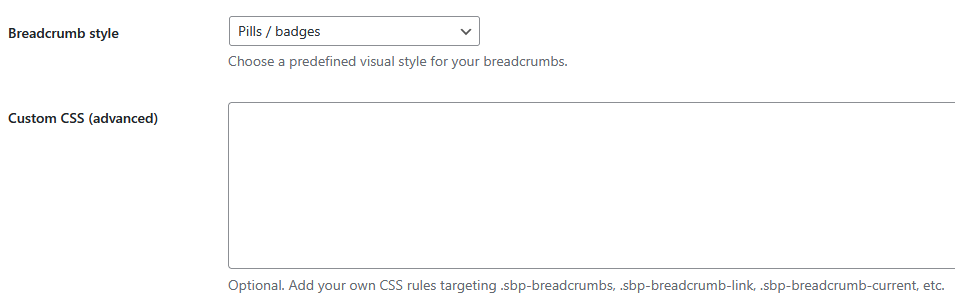
Choose a predefined visual style:
- Minimal
- Underline
- Pills
You can further customize styles using Custom CSS.
Custom CSS
Optional. Add your own CSS rules targeting:
.sbp-breadcrumbs
.sbp-breadcrumb-link
.sbp-breadcrumb-current
Per-Page Breadcrumb Control (Meta Box)
Each supported page includes a SEO Breadcrumbs meta box.
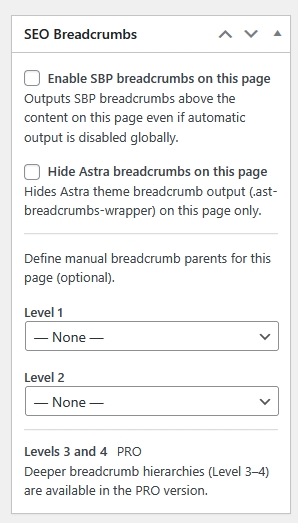
Available Options
Enable Breadcrumbs on This Page
Forces breadcrumbs to display on this page even if automatic output is disabled globally.
Hide Theme Breadcrumbs on This Page
Hides breadcrumbs generated by the theme (e.g. Astra) only for this page.
Manual Breadcrumb Levels
You can manually define parent pages (e.g. Level 1, Level 2). The PREMIUM version supports deeper levels (up to 4 except home).
This allows you to override the default hierarchy without changing page structure.
Rules (PREMIUM)

Rules allow you to apply breadcrumbs in bulk. Similar to a Redirection plugin, you can easily set breadcrumbs for multiple pages. This option significantly speeds up your workflow; you don’t have to visit individual pages, insert shortcodes, or configure meta boxes.
First, you choose a target page, then up to four levels (excluding home) of breadcrumbs. This way, you create rules en masse.
Rules have higher priority than per-page meta settings.
Use Rules when:
- managing large websites,
- restructuring content,
- applying consistent breadcrumb paths across many pages.
Tools (PREMIUM)
Once you’ve created bulk rules in the Tools tab, you can export them in JSON and CSV formats. Furthermore, you can also import a pre-made breadcrumbs list. This is very helpful for managing the SEO of large websites. The file structure is very simple. You can download a sample CSV file here.
Shortcode Usage
Use the shortcode when you want full manual control:
[seo_breadcrumbs]Custom Breadcrumb Levels
You can define custom levels directly:
[seo_breadcrumbs level1="Services" level2="Consulting"]The plugin will automatically resolve pages by slug, path, or title. The free version allows for 2 levels (except home), while the PREMIUM version allows for 4 (except home).
Shortcodes always work regardless of global settings.
Compatibility & Overrides
SEO Breadcrumbs Pro is designed to coexist with other SEO plugins and themes.

Theme Breadcrumbs
You can hide most pupar theme (Astra) breadcrumbs globally. For other templates, you must provide the appropriate classes.
WooCommerce
You can disable built-in WooCommerce breadcrumbs to avoid duplication.
Other SEO Plugins
If another plugin outputs breadcrumb schema (JSON-LD), you can disable schema output in SEO Breadcrumbs Pro to avoid duplicates.
Lite (Free) vs Premium
The Free version is perfect for:
- basic breadcrumb control on pages,
- shortcode usage,
- simple setups.
The PREMIUM version adds:
- Rules (bulk control),
- deeper hierarchies (up to 4 levels),
- custom post types,
- import/export tools,
- advanced overrides.
Support
SEO Breadcrumbs Pro is designed to be stable and non-invasive.
If you need help, check this documentation, watch our video tutorials, or contact us at:
support@seobreadcrumbspro.com
Updates & Changelog
The plugin is actively maintained and improved.
New features and fixes are documented in the changelog on our website.